
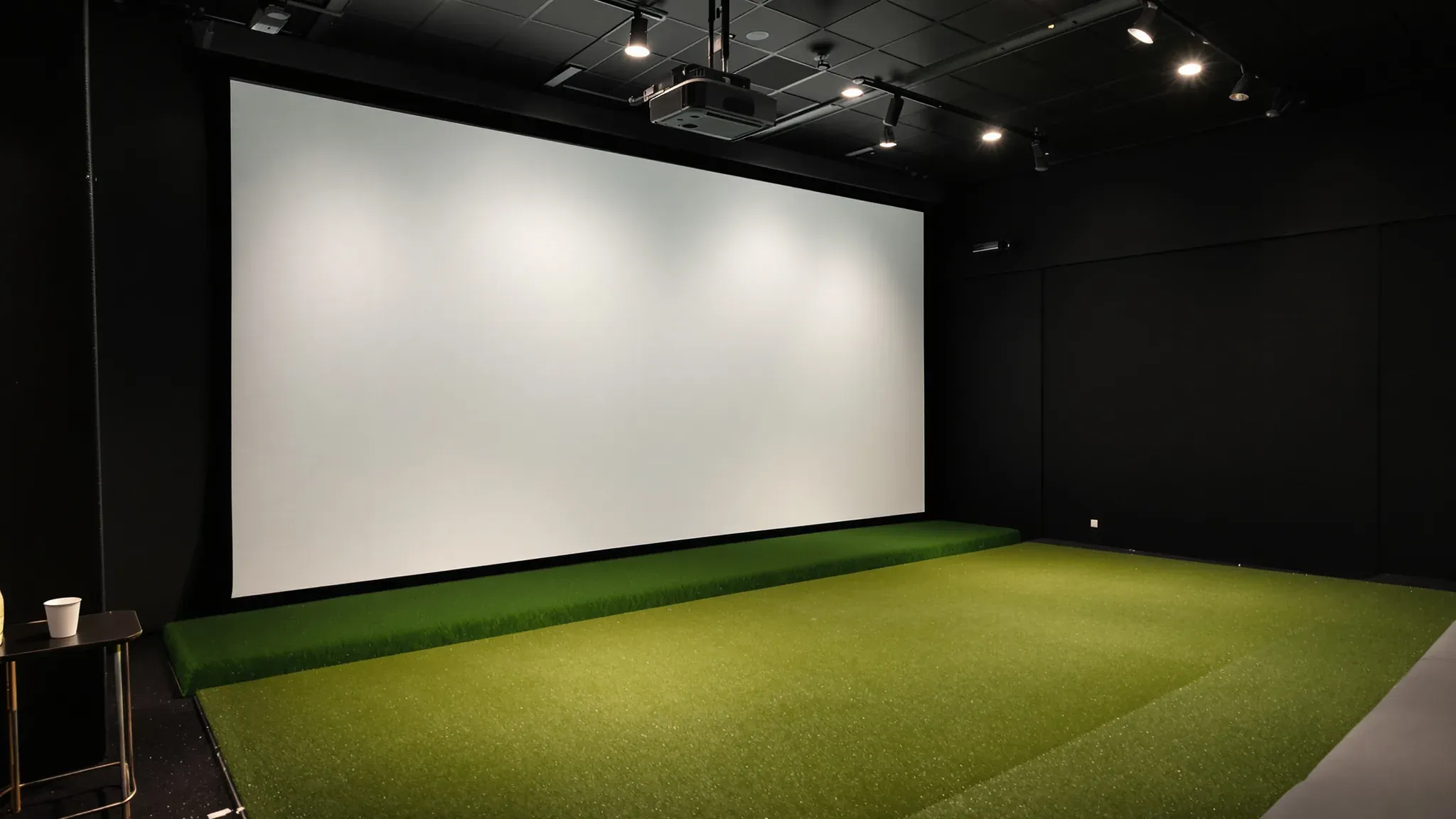
An indoor golf venue sells time in its simulator bays, and every bay has to give a full swing that clears everything overhead and a projected picture that stays bright and sharp. The measurement that decides whether a tenancy can hold bays, and how many, is the clear height above each hitting position, followed by the width available along the bay line.
The simulator company supplies and installs the impact screens, enclosures, projectors, launch monitors (the sensors that track the ball and the club) and the computers that run each bay. We can build the bay walls, the ceilings, the fixings for projectors and sensors, and the lounge, bar and toilets behind the bays, and coordinate the lighting, power, data and fire services around the supplier's layout drawing.
Bay Width, Depth and Clear Height
Bay sizes come from the simulator maker, and one launch monitor maker recommends a room at least 4.6 metres wide, 5.5 metres deep and 3.1 metres high for its system, with the ball no closer than 2.5 metres to the screen. Other suppliers' guidance for commercial bays sits close to that, at about 4 to 4.6 metres wide, 4.9 to 6.1 metres deep and about 3 metres of clear height or more. That height usually points to a warehouse, a large retail unit or a tall commercial floor.
Width lets left-handed and right-handed players use the same centred mat, and it sets how many bays fit along a wall. Depth is a row of fixed items laid end to end. Behind the impact screen there is a gap of at least 300 mm so the screen can flex when a ball hits it, then the screen and its frame, the ball flight to the tee, the golfer's swing and room behind for the next player to wait. We draw that row from the supplier's layout before any wall is set out.
Clear height is measured from the hitting surface rather than the floor, so a raised hitting platform or a thick turf build-up takes height away. It is measured to the lowest thing over the swing, which is often a sprinkler pipe, a duct, a beam, a cable tray or a light fitting rather than the roof or the slab.
On a golf simulator fitout our first site visit is spent with a laser along the whole bay line, recording the lowest item over each hitting position, because one low sprinkler main crossing the line can rule out the bay beneath it. Where an existing duct or pipe sits too low, the mechanical or fire services trade can usually reroute it between the bays or over the lounge. That work is priced and programmed before the bays are framed, since it is far harder to reach once the walls and ceilings are in.
The Ceiling over the Swing
There are two ways to finish the ceiling over a bay. One leaves the structure open and paints it, which keeps every millimetre of height over the swing. In an exposed ceiling the soffit or roof, the ducts and the pipes are sprayed in one colour before anything is hung below them. Over a simulator bay, suppliers recommend a dark matt colour, which stops stray light bouncing back onto the screen and washing out the picture.
The other is a ceiling built at a set height. Where the roof is well above what the bays need, we can install a suspended ceiling over the bays at a level that clears the swing, in a dark matt finish, and run the same ceiling system over the lounge, bar and toilets at a lower height. A flat ceiling over the hitting area also gives an overhead sensor a level surface to fix to.
With either finish, nothing hangs down into the swing zone shown on the supplier's drawing. Light fittings over the hitting area are kept up at ceiling level, and air conditioning diffusers and sprinkler heads are set out behind the golfer or between bays where the layout allows. Sprinkler positions are designed by the fire services trade against the finished walls and ceiling, and where a head has to sit close to the swing zone, that trade may fit a wire guard listed for that sprinkler.
Simulator suppliers advise protecting walls and ceilings wherever a mishit can travel, and balls also rebound off the screen. Over the front of the bay, near the enclosure, we can line the ceiling with a board that takes a knock, or the supplier's padding covers it.
Fixings for Projectors and Overhead Sensors
Each bay's projector is usually mounted on the ceiling above and slightly behind the hitting area, where the golfer cannot cast a shadow on the screen and a club cannot reach it. The bracket is fixed back to the building structure, or to steel framing we build for it under the roof or slab. One ceiling grid maker states that its suspension system is designed to carry the weight of the ceiling only, so we do not hang a projector off a lay-in tile grid.
Some simulators use an overhead launch monitor, a sensor fixed above the hitting area that watches the ball and club from above. One maker sets its direct fix at 2.85 to 3.05 metres from the hitting surface to the ceiling, with a drop pole for anything higher, and asks for a level ceiling and floor. Under a high roof we can build a level framed ceiling over the hitting area at that height, with backing (extra framing behind the board for the fixings to bite into) where the mount goes.
Both items need power and data at the mount. One maker's overhead sensor runs on a shielded network cable to the bay's computer, and the projector needs a video cable from the same computer. One maker warns that these cable runs have length limits, so the computer position is fixed first and we can run conduit from it to each mount before the ceiling is closed.
We set every mount, outlet and cable route on a reflected ceiling plan drawn from the simulator supplier's layout. The electrician, the data cabler and the fire services trade then work to the same positions, and each mount sits where the supplier's drawing puts it.
Walls Between the Bays
Bays sit side by side, and each one produces ball strikes on the screen, club contact on the mat and the simulator's own audio at the same time. Plasterboard partitions between the bays can take insulation in the stud cavity and a dense acoustic plasterboard on each face, which together reduce the sound passing from one bay to the next.
A bay wall that stops at a suspended ceiling lets sound travel over its top through the ceiling space, so we can take the studs through the ceiling to the slab or the roof structure above. Suppliers also note that fully closed bays can make a venue feel disconnected, so the plan can leave the bay fronts open to the lounge and rely on solid side walls and absorbent finishes on the walls and ceiling.
Near the hitting zone the walls take knocks as well as sound. We can line the lower part of each side wall with impact-resistant plasterboard, which has a dense, fibre-reinforced core, and the supplier's padding fixes over it.
The impact screen and its enclosure belong to the simulator company. One screen maker fixes its screen corners into the wall framing and asks for no plasterboard anchors, so we build backing into the bay walls and ceiling at the points marked on the supplier's drawing before the board goes on. The enclosure installers then fix straight into framing when they arrive.
Lighting That Stays off the Screen
Bay lighting is designed and installed by the electrical trade, and we build the ceiling to take it. Simulator suppliers place the main light over the hitting area or slightly behind the golfer, so the player and the ball are lit without a shadow falling forward onto the screen. No fitting points at the screen or sits in the projector's path, because direct light on the screen washes out the picture.
Camera-based launch monitors need a steady, well-lit view of the ball and club at impact. Supplier guidance warns that lower-quality LED lamps can flicker at a rate a high-speed camera picks up, so the electrician can select flicker-free fittings over the hitting area. One maker also notes that strong daylight can affect its overhead sensor's cameras, so where the plan allows we set the bays away from the windows.
Suppliers recommend dimmers, and each bay can have its own, so staff can keep the hitting spot bright while the rest of the bay and the lounge behind it sit low. We set the switch and dimmer positions in the bay walls while they are framed, and the walls near the screen can take the same dark matt paint as the ceiling.
The Lounge, Bar and Toilets Behind the Bays
The lounge is where the venue sells food and drink between shots, and placing it behind the bay line lets groups sit and watch through the open bay fronts. Supplier guidance keeps drinks away from the electronics and the swing, and leaves a protected walkway along the back of the bays so guests and staff can pass without crossing a hitting zone. We mark that line on the floor plan and can build a low wall or a change of floor finish along it.
The lounge ceiling can sit lower than the bays and does more of the acoustic work. We can line it with perforated plasterboard over insulation, which absorbs sound and cuts the echo from the bays and the music, so groups can talk at the tables.
The bar needs water, drainage and power for fridges and a glass washer, and often a cool room behind it, as a small bar does. We plan it with the toilets so both can share one drainage run where the building allows. Turning a warehouse or shop into a place where people gather can change how the building is classified under the NCC, and the exits, fire services and toilet numbers that follow are confirmed with the certifier.
Build Order Around the Simulator Install
The simulator company's install date is set early and our programme is worked back from it, so the bays are finished, painted and clear when its installers arrive. We start overhead while the floor is clear for scissor lifts. Low ducts and pipes are moved off the bay line, the framing for projector and sensor mounts goes up, and conduit is run from each computer position to its mounts.
The bay walls are framed next with their backing and insulation, then the ceilings go in, followed by the dark paint over the bays and the impact-resistant lining near the hitting zones. The electrician fits off the lights, dimmers, power and data, and the fire services trade sets its heads against the finished walls and ceiling.
The simulator company then installs the enclosures, screens, projectors and sensors and calibrates each bay. The lounge, bar and toilets can be finished around that install, with the bay fronts protected until the screens and turf are in.
We can build the bay walls, ceilings and mounts for a golf simulator venue from the supplier's drawings, starting with a laser-measured clear height along the bay line, and sequence the work around the simulator install.
📞 Call us on 1300 60 93 93