
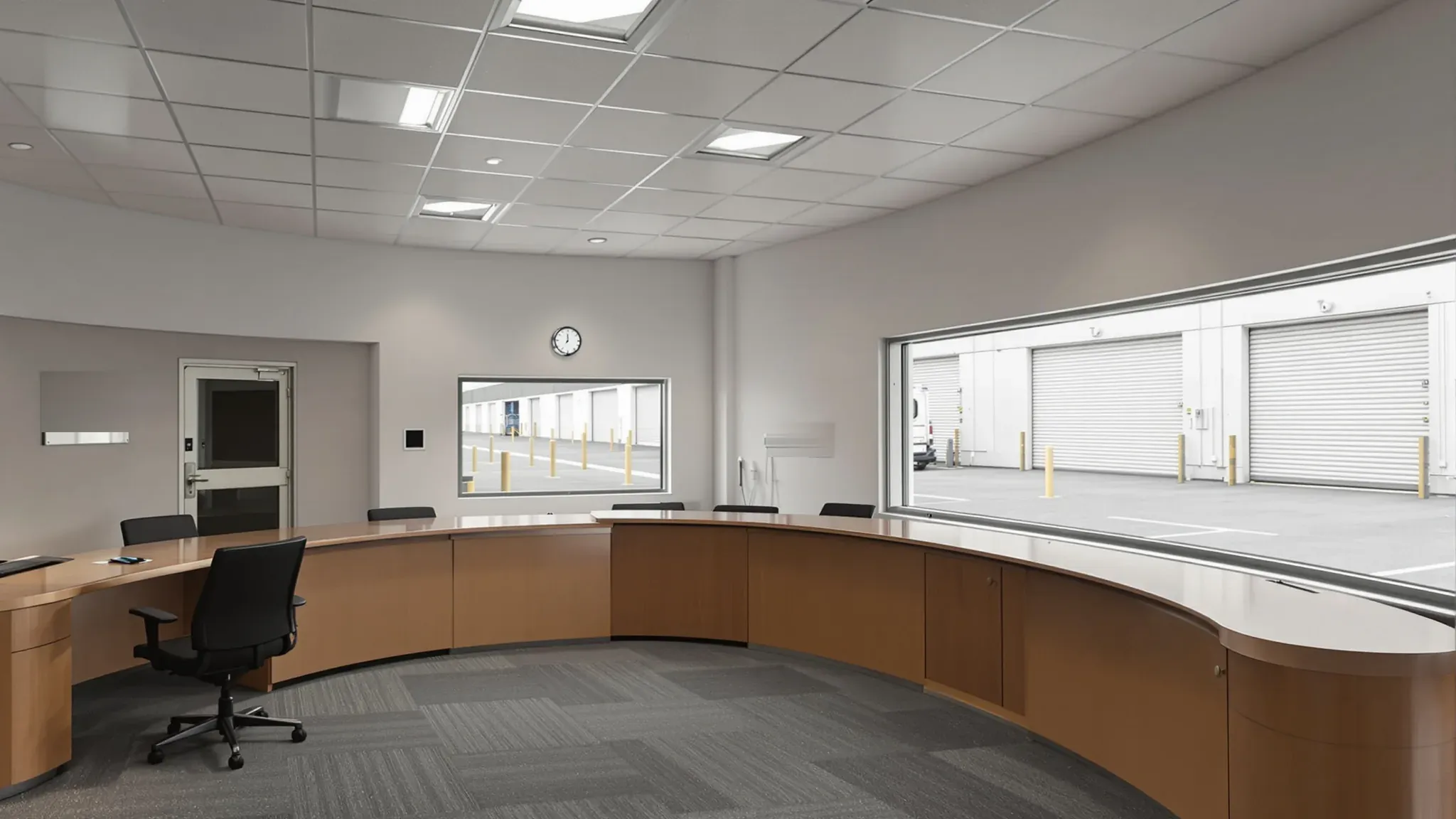
A control or dispatch room is built around what its operators need to see and hear, at every hour of the day and night. Each seat needs a clear view of the video wall, and often of the dock or the yard, in a room quiet enough to pick out one radio call while other operators are talking. The layout starts from those sightlines, and the build is aimed at a room that stays quiet and never stops running.
Logistics, transport, security and facilities operators often put these rooms inside a warehouse or on an industrial or business park site, as part of a wider warehouse and industrial fitout. We can build the room, its internal glass and ceilings, the wall that carries the video wall and the support rooms beside it, and coordinate the console, AV, data, electrical and mechanical trades around that work. The consoles and furniture come from the console supplier and sit outside our scope.
Room Size and Shape from the Console Plan
The console supplier usually lays out the operator positions first, often working to ISO 11064, the international standard on the ergonomic design of control centres. Its parts cover how a control room and its support rooms are arranged, the room layout, workstation layout, displays, and working conditions including lighting and acoustics. The part on room layout covers transport and dispatch rooms, and asks for layouts drawn around face-to-face contact between operators and their sightlines to shared displays.
We then build the room to that plan. The distance from the back row of consoles to the video wall sets the room's depth, and a wide, shallow room generally suits a video wall better than a square one. The ceiling has to clear the top of the display with space left for light fittings and cable trays, so we check the clear height under the roof, ducts and sprinkler pipes before the layout is fixed.
Nothing should stand between an operator and the video wall. A column, a bulkhead boxing in a duct, or a door people walk through all break the view, and the standard counts floor space around pillars, awkward corners and entrances as unusable. The UK Health and Safety Executive (HSE) control room guidance asks for people to move around the room with the least disruption to operators. We can place the entry at the back or side, so anyone coming or going passes behind the consoles.
The Video Wall: Backing, Outlets and Service Access
The wall that carries the video wall holds a row of heavy screens or LED panels on mounts, so the fixing structure goes into the frame before any board is fixed. Plasterboard makers detail heavy fixtures with boxed studs either side and noggings or a steel plate between them. For a video wall we can line the whole mounting area with plywood behind the plasterboard, or fix steel channels at the AV supplier's mount positions, and an engineer can confirm the framing for a large display.
The wall also has to be flat. Plasterboard over uneven framing shows at the joins between screens, so we set the studs straight and true across the full width of the display. Mounts with fine adjustment then line the screens up edge to edge.
Each screen or panel needs power and a signal cable. We set flush outlets and conduits behind each one to the AV supplier's drawing, running back to the comms room or an equipment rack, while the wall is still open. Adding a cable later means opening a wall that already has screens hanging on it.
Servicing is settled at the same time. Some LED walls are serviced from behind and need a walkway behind the display for a technician, with its own door and lighting. Front-serviced panels, and pop-out mounts that pull each flat screen forward, let the display sit on one plain wall. The AV supplier's choice decides whether we build a service corridor or a single wall, so it is agreed before framing starts.
Glass onto the Floor, the Dock and the Supervisor's Room
Glass gives operators a direct view of what they are coordinating. A supervisor's room glazed onto the operators' floor lets the shift lead watch the room and the video wall from a desk. An internal window onto the warehouse floor or the loading dock lets a dispatcher see which doors are open and which trucks are waiting. ISO 11064 lists observation windows among a control room's displays, and we place them with the same care as the screens.
Glass reflects as well. At night a window mirrors lit screens and light fittings back into the room, and a window directly behind an operator puts that reflection onto their screens. We can set the dock window in a side wall, at right angles to the consoles, so operators turn to look out instead of facing it or sitting with it behind them. Where a reflection still falls in someone's view, anti-reflective glass coated on both faces reduces it.
Daylight is the other problem. With the roller doors open on a bright afternoon, the dock can be far brighter than the control room, and the HSE guidance asks for a way to block direct sunlight. A tinted film on the control room side brings the brightness down while keeping the view, and a blind can shut out the glare at the worst times of day.
The glass also has to keep warehouse noise out. We can build the dock window and the supervisor's room front as framed acoustic glass partitions, using laminated glass with an interlayer made to reduce sound, sealed all round in its frame. The door and the head and base of the supervisor's glass are sealed too, which stops voices carrying through the glass onto the operators' floor. Windows in the building's outside walls are a separate trade.
Walls and Doors That Keep the Warehouse Out
Forklifts, roller doors, trucks reversing onto the dock and plant on the roof all make noise that operators should not have to talk over. We can frame the walls facing the warehouse in steel studs, fill the cavity with insulation and add extra layers of plasterboard. We can keep glass to the openings where someone needs a view and build the rest solid, the same mix of glass and plasterboard used for office zones inside a warehouse.
Those walls go up to the roof or the slab above, or to a sealed ceiling of set plasterboard built over the room. Under a high warehouse roof, a wall that stops at a tile ceiling leaves an open void for sound to cross. The acoustic consultants' guideline for commercial buildings says walls should preferably run full height for reasonable separation.
A door lets through more sound than the wall around it, mostly through the gaps at its edges. We can hang solid-core doors with acoustic seals around the frame, an automatic seal at the floor and a closer, so each door shuts behind people on their way in and out. Every cable tray, pipe and duct passing through these walls is sealed around before the ceiling closes, because the same guideline lists service penetrations among the paths sound takes.
Absorbing Voices and Radio Traffic Inside the Room
The room makes plenty of noise of its own. Several operators talk into headsets and radios at once, alarms sound at the consoles and a supervisor may brief the whole shift. One video wall maker's design guide notes that poor acoustic treatment makes it harder for operators to tell radio traffic from alert tones. The acoustic environment is one of the subjects of ISO 11064-6, and an acoustic consultant can set targets for the room.
The ceiling is the largest surface left free for absorption once the video wall and glass take up much of the walls. We can install a suspended acoustic ceiling across the whole room in tiles rated Class A, the highest sound absorption class under ISO 11654, with light fittings and air grilles set into the grid. A plain, matt ceiling with nothing hanging down into the room also keeps stray reflections out of the screens.
A control room has more hard surfaces than most rooms. The video wall fills one end and glass fills part of a side, so sound keeps bouncing between hard walls after the ceiling has done its work. Wall absorbers reduce those echoes and the reflections off a distant rear wall. We can fix absorptive panels to the back wall facing the display and to the solid wall opposite the glass, with backing built into the studs before they are sheeted.
Equipment adds noise and heat. ISO 11064-6 recommends housing noisy equipment in a separate room or shielding it. The operators' computers can sit in the comms room next door, with extenders carrying the screen, keyboard and mouse signals out to each console.
Cables, Power, Air and Light for Round-the-Clock Use
Each console takes power, data, AV and radio cables, and they need a route that can be opened again when a console is added or moved. A raised access floor gives that route under the consoles, with panels that lift wherever a cable has to go. Where the room stays on the slab, cable trays above the ceiling can drop into the back of each console.
The cables run back to a comms room beside the control room. We can build its walls, door and ceiling, and the data trade installs the racks and cabling. Keeping it next door keeps the cable runs short and the rack noise out of the operators' room.
Consoles, the video wall and the radios usually need to keep running through a power cut. The electrician can wire them on circuits fed from an uninterruptible power supply, or UPS, whose batteries take over the load with no break when the mains power drops. The batteries carry those circuits until a generator takes over or the equipment can be shut down in order.
A control room typically runs around the clock and is rarely shut down once it is operating. Screens, computers and radios turn the power they draw into heat, and every operator adds more, so the mechanical trade sizes the air conditioning for that load. The room can have its own system and controls, independent of the warehouse and the building's standard hours, and some operators ask for a second unit so the room stays cool if one fails.
Lighting is set out for screens. The HSE guidance asks for lighting that does not reflect in screens and suggests adjustable lighting where a room is staffed around the clock. We can install indirect or low-glare fittings on dimmers, placed so no fitting shows in a screen and none washes across the face of the video wall.
Break Room, Toilet and Quiet Room Close By
Operators on a long shift still need breaks, and someone has to cover their console while they are away. ISO 11064 groups the control room and the rooms that support it into a control suite beside it, and its example includes a kitchen, eating and rest areas and toilets. We can plan a break room, a toilet and a quiet room within a short walk of the control room door, so an operator can step out and be back at the console quickly.
Those rooms make their own noise. Kitchen noise and conversation over a meal should not reach the operators, so we can put a corridor or a store between the break room and the control room and build the walls between them insulated and full height, with sealed doors. A quiet room, where an operator can sit down after a hard call or rest on a night shift, is built the same way, with its lighting on a dimmer.
Building Beside a Room That Stays Live
Where an existing control room is being replaced, it keeps working until the new one is ready. We can build the new room complete and clean it out before the console and AV suppliers start their install. They then install and test in a finished room, and the operators move across once the systems are commissioned. Where the new room takes the old room's place, we can build a temporary room elsewhere on the site first, so the operation carries on through the works.
When we price a control or dispatch room, we start from the console supplier's layout and the video wall drawing, then build the walls, glass and ceiling around those sightlines.
📞 Call us on 1300 60 93 93